
Know Exactly Where Every Lead Comes From
LeadSourcePro tracks UTM parameters, ad platform click IDs, and referral sources — then attaches that data to every form submission in WordPress. So you can see exactly which campaigns, channels, and ads are generating real leads.
You’re Spending Money on Ads. But Which Ones Are Actually Generating Leads?
Google Analytics tells you how many visitors came from each channel. But it can’t tell you which specific leads came from your Google Ads campaign versus your Facebook retargeting. LeadSourcePro bridges that gap — giving you lead-level attribution right inside WordPress.
Stop guessing which half of your marketing budget is working. Start seeing real data, attached to real leads, so you can double down on what’s actually driving results.
How It Works
1
Install & Activate
Upload the plugin, run the 5-step setup wizard, and you’re done. LeadSourcePro auto-detects your form plugins — no form editing required.
2
Leads Come In With Source Data
When someone submits a form, LeadSourcePro captures the traffic source, UTM parameters, click IDs, landing page, and referrer — automatically.
3
See What’s Working
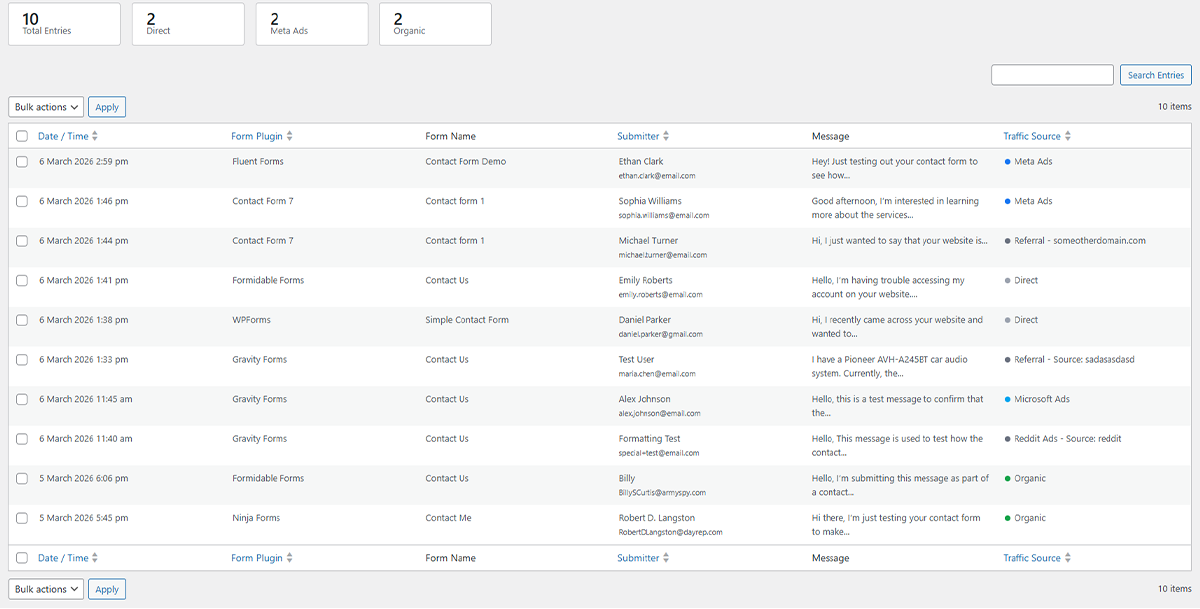
Open your WordPress dashboard and see every lead alongside its source. Colour-coded badges show you at a glance whether it came from Google Ads, Meta, organic search, or anywhere else.
Your Leads. Their Sources. One Dashboard.
Every form submission appears in a native WordPress table with colour-coded source badges. Click any entry to see the full details — UTM parameters, click IDs, landing page, and more.
Everything You Need to Track Lead Sources
Automatic UTM Tracking
Captures utm_source, utm_medium, utm_campaign, utm_term, and utm_content from every visitor — stored in a cookie until they submit a form.
6 Ad Platforms Detected
Automatically identifies clicks from Google Ads, Meta (Facebook & Instagram), LinkedIn, TikTok, Microsoft Ads, and Yahoo using their unique click IDs.
Works With Your Forms
Hooks directly into your existing form plugin — no shortcodes, no hidden fields, no form editing. Just install and it works.
Email Notifications
Get an email every time a lead comes in — complete with their name, message, and source data. Plus daily, weekly, and monthly summary emails (Pro).
One-Click CSV Export
Export all your lead data to CSV for reporting, importing into your CRM, or sharing with your team. Clean, formatted, ready to use.
Privacy-First Design
All data stays in your WordPress database. No external tracking, no data sent to third parties. IP addresses are automatically anonymised. GDPR-friendly by design.
Works With the Form Plugins You Already Use
LeadSourcePro integrates automatically with the most popular WordPress form plugins. No shortcodes, no hidden fields — just install and it works.
- Contact Form 7
- WPForms
- Gravity Forms
- Ninja Forms
- Formidable Forms
- Fluent Forms
- Elementor Pro Forms
More integrations coming soon. Using a different form plugin? Let us know.
Simple, Transparent Pricing
Start free. Upgrade when you need unlimited storage and email notifications.
Free
$0
Free forever
- All tracking features
- 10 most recent entries
- Dashboard with search
- CSV export
- Setup wizard
Most Popular
Business
$99
per year
- Everything in Free
- Unlimited entry storage
- Per-submission email alerts
- Monthly summary emails
- 30-day free trial
Stop Guessing. Start Knowing.
Install LeadSourcePro in under two minutes. Free forever — upgrade when you’re ready.